Migrating from Axiell CALM
· Updated
Read in 3 minutes
We announce atom-tool, part of the Orangeleaf CollectionsBase suite: an interactive, iterative CALM to AtoM migration and mapping tool that reduces the burden of moving thirty years of archival cataloguing out of Axiell CALM.
James Grimster writes:
We are announcing a new tool as part of our CollectionsBase suite of applications, the simply named atom-tool to assist in CALM migrations.
Developed in partnership with a number of our customers, my team has built a tool that allows me to work interactively and iteratively with CALM DScribe database XML exports from CALM, into the internationally regarded and popular Access To Memory (AtoM) application. We provide AtoM hosted and managed as a SaaS (Software as a Service) part of our CollectionsBase platform. We choose AtoM in order to meet our customers’ Business Continuity requirements, and it is a good fit for customers exiting CALM.
Why migrating from CALM is a huge challenge
There are over 700 CALM fields, with at most 20% that are directly mappable to ISAD(G). It represents thirty years of being used for archives, museums and libraries, and this is reflected in the fields list.
Over two decades, I’ve worked with archives, both county record offices and community archives, and each and every one of them uses CALM in subtly different ways. There are nine UserText fields: even in one repository, a UserText field may have been used for different data, or different contexts, depending on the projects at the time. Then there’s UserPeriod, UserDate, and the rest.
Volunteers some ten years ago used PersonName free text; others used PersonCode. It becomes a business decision to look at disambiguating names at source in CALM via authority files, or afterwards once the data is in AtoM.
Migration and mapping can only be done side by side with the client, with test imports into AtoM. The issue here is that this process is extremely resource intensive, and we need to scale capacity.
What atom-tool does
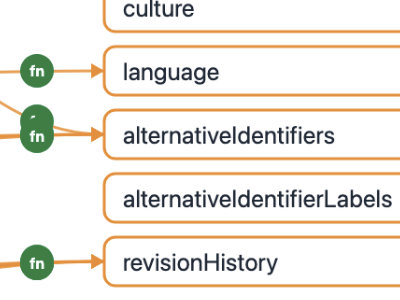
My team have developed a tool to provide both visualisation of the current mapping — for description, accession, deaccession, authority files, relationships and locations — that shows in real time the flow process and custom functions I am constructing as part of the consultation.
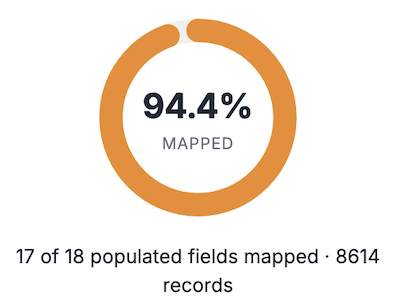
The new tool then provides a coverage analysis of the mapping: the holy grail being 100% coverage with no transfer loss of any data in CALM (including all audit, revision history, and internal system identifiers). 100% coverage is hard.
The tool also hugely speeds up the “pre-flight” checks by using AtoM’s own validations before import is needed, providing a Go or No-Go before import, to save multiple round trips.
From consultation to production import
AtoM-tool forms part of both our initial consultation work — defining and building, with version control, the customer mapping for descriptions, accessions and authority — to work toward a Version 1.0 “contract” between CALM and AtoM. Once this is achieved, we then deploy to AWS containers the per-customer mapping application for the archivists (and any volunteers and helpers at this stage) to produce the AtoM import files. For our county record offices we provide a Staging and Production setup, so that staff can run test imports in Staging before final imports.
Migrating from CALM isn’t simply a case of choosing an alternative Collection Management System: it is at that boundary that thirty years of CALM use by dozens — hundreds in some cases — of people within each archive, some with cataloguing standards and some without, becomes all too apparent.
I am hoping our new tool will reduce the burden of this transition, even if only slightly.
Related reading
- ICA-AtoM and CollectionsBase for the National Brewery Centre Archive and Museum — our long-running production example of AtoM within CollectionsBase.
- Replacing CalmView: a feature comparison — how the public-facing search interface changes when moving away from CALM.
- Supporting the seamless migration from CALM to Axiell Collections — our earlier work supporting the CALM-to-Axiell Collections upgrade path.
- Services — full details of our archives consultancy, CALM migration, and AtoM hosting.
How Orangeleaf Systems migrates a UK archive from Axiell CALM to Access to Memory (AtoM)
An outline of the atom-tool CALM to AtoM migration process, from initial DScribe export through to production load.
- Export from CALM. The archive team produces a full CALM DScribe XML export covering descriptions, accessions, authority files, locations and relationships.
- Interactive mapping consultation. Working iteratively with the archive, atom-tool visualises how each CALM field is being mapped — including local usage of UserText, UserPeriod, UserDate and PersonName — and applies generic and customer-specific transformation functions.
- Coverage analysis. atom-tool reports real-time coverage of the mapping against the source CALM data, exposing fields that would lose information and driving business decisions about ISAD Source folding versus ExtendedFields promotion.
- Version 1.0 mapping contract. The mapping is version-controlled and signed off as a Version 1.0 contract between CALM and AtoM, ensuring reproducibility and auditability of the migration.
- Deployment to AWS London. The per-customer mapping is deployed to UK based AWS containers and S3 for continuous production of import files for AtoM.
- Pre-flight validation. atom-tool runs the generated AtoM import files through AtoM's own validation, producing a Go or No-Go result before any load is attempted.
- Production load into AtoM. Validated imports are loaded into the customer's hosted, managed AtoM instance within the Orangeleaf CollectionsBase platform.
Frequently asked questions
- How does atom-tool migrate data from Axiell CALM to AtoM?
- atom-tool consumes CALM’s XML exports and parses each field against the published CALM DScribe Document Type Declarations. Every field is passed through a combination of generic mapping functions and customer-specific transformations that we author interactively with the archive during consultation. The result is a set of AtoM import files that have already been validated against AtoM’s own import checks before any load is attempted.
- What happens to CALM fields that don't map to ISAD(G)?
- Only around 20% of CALM’s 700-plus fields map directly to ISAD(G). For the rest, business decisions are required. Highly specific legacy fields — for example those originally used for Access to Archives (A2A) submissions — can be folded into ISAD Source using our open markdown notation, so the data is preserved and recoverable back to XML in the future without cluttering the day-to-day editing interface. Fields carrying substantial curatorial effort, such as PlaceCoordinates, are promoted into AtoM’s ExtendedFields via a small addition we maintain on our branch of AtoM, so they remain fully managed and indexed.
- Why is CALM migration so difficult?
- CALM has been in continuous use in UK archives, museums and libraries for around thirty years. Each repository has developed its own local conventions — nine UserText fields, UserPeriod and UserDate fields alongside all the others have often been repurposed across projects and decades. Volunteers ten years ago may have used free-text PersonName while others used PersonCode via name authority file. Migration is therefore not a technical exercise alone: it is a curatorial exercise in disambiguating and standardising thirty years of accumulated practice, and can only be done side by side with the client.
- What is coverage analysis in a CALM migration?
- Coverage analysis measures the proportion of source CALM data — including audit trails, revision history and internal system identifiers — that is successfully carried across into the destination AtoM instance without loss. atom-tool renders coverage in real time as the mapping evolves. The holy grail is 100% coverage with zero transfer loss; in practice, achieving 100% is hard and often requires promoting non-ISAD fields into ExtendedFields or preserving them in ISAD Source via structured markdown.
- Why AtoM as the destination for CALM data?
- Access to Memory (AtoM) is an internationally regarded, open-source archival description application built around ISAD(G), ISAAR(CPF) and related descriptive standards. Orangeleaf provides AtoM as a hosted, managed Software-as-a-Service platform within the CollectionsBase suite. AtoM’s open-source foundation directly supports our customers’ Business Continuity requirements and provides a durable, standards-based home for archives leaving CALM.
- How do you avoid multiple failed import round-trips?
- atom-tool performs “pre-flight” checks by running the generated import against AtoM’s own validation rules before any load is attempted. This produces a clear Go / No-Go result and dramatically reduces the number of round-trips between the consultant, the archive team and the destination AtoM environment — which is essential when migration is already extremely resource intensive.
- How is atom-tool deployed for a live migration project?
- atom-tool is used in two phases. During consultation we work interactively and iteratively with the archive to define, refine and version-control the mapping for descriptions, accessions, deaccessions, authority records, relationships and locations — culminating in a “Version 1.0” version-controlled mapping that acts as the contract between CALM and AtoM. We then deploy that per-customer mapping to AWS containers so that archivists, volunteers and helpers can run the transformation themselves. For county record offices we provision separate Staging and Production environments so that staff can rehearse test imports before the final Production load.